Why Our Free Tools Run In Your Browser: Three Checks That Never See Your Data

Every free online tool asks you to make the same decision, usually without saying so. You paste something in, you press a button, and the question you just answered is whether that text should leave your machine.
Look at what is actually in these inputs. An A2A Agent Card is a description of your internal service topology: what your agents are called, what they can do, which endpoints they answer on. A log event carries trace ids, model names, and sometimes a fragment of the prompt a user typed. A savings projection is personal finance. None are secrets in the sense of a password, and all three are the kind of thing you would rather not hand to a stranger’s server because a text box asked nicely.
So we built our three tools without a server to hand it to.
What client-side actually means
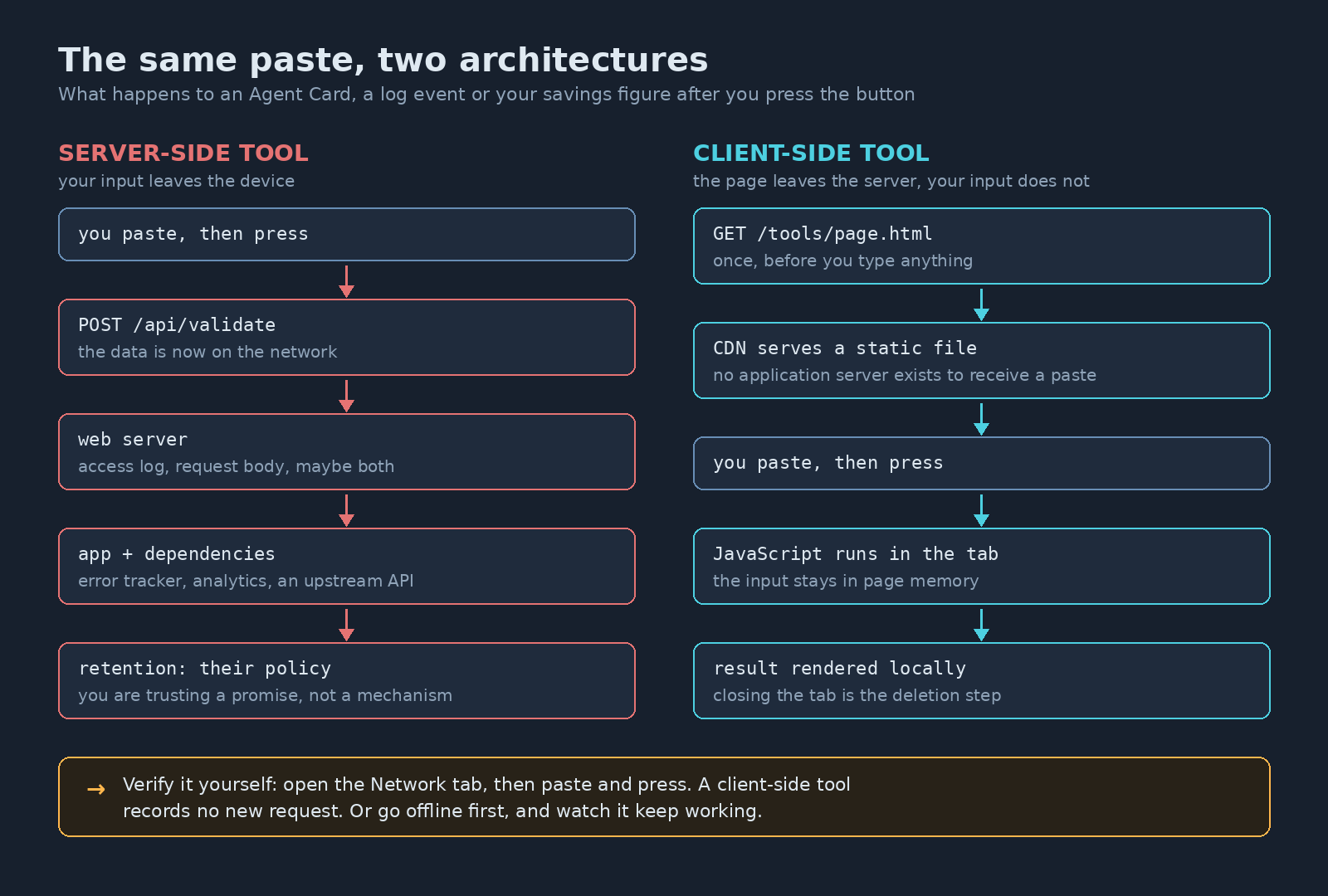
A static site has no application server. The page and its JavaScript are files, fetched once from a CDN edge, and everything after that runs inside your tab. When you paste an Agent Card and click validate, the parsing happens in your browser’s memory. No request carries the text anywhere, so there is nothing to log and no retention policy of ours you have to trust.
This is an ordinary hosting arrangement, not a clever one. Amazon’s documentation puts it plainly: on a static website, “individual webpages include static content. They might also contain client-side scripts.” Azure Static Web Apps describes the same shape: “static assets are separated from a traditional web server and are instead served from points geographically distributed around the world.” Google Cloud Storage hosts static websites the same way, with Cloud CDN in front if you want it.
The three tools, and what each one does not tell you
The A2A Agent Card Validator checks a card’s structure against the shape the A2A specification defines, and decodes the header of its JWS signature so you can see what algorithm and key it claims. It does not cryptographically verify that signature. Even if it did, section 8.4 is careful about what you would learn: “Signature verification confirms the Agent Card originated from the claimed source and has not been modified.” Origin and integrity, not that the agent is trustworthy or that the skills it advertises are real.
The Agent Log Event Checker takes one log event or OpenTelemetry span and reports which provenance fields are present, against the three planes from the earlier post on what to log. Field names follow OpenTelemetry’s GenAI conventions where they exist. A field being present is not the same as retention you can afford, and it judges a single event, not the pipeline that produced it.
The Monte Carlo Savings Simulator runs thousands of randomized scenarios and shows the range of outcomes rather than one confident number. It is a lognormal model assuming constant contributions, educational and not financial advice.
What you give up
Real things. No saved history, so closing the tab loses your work. No sharing a result by URL, because the result never existed anywhere but your tab. Your device does the computation, which the simulator will make you notice. And a large input is bounded by what the tab can hold rather than by a server you can throw memory at.
That trade is worth it for input that describes your own systems or your own finances, and a bad trade for plenty of other tools. Anything needing a private model, a large dataset, or a shared workspace genuinely needs a server, and a vendor running one is solving a problem, not being careless. The argument is about what the input contains.
How to check any tool’s claim
Do not take our word for it, or anyone else’s.
- Open your browser’s developer tools, switch to the Network tab, paste your input and run the tool. If no request leaves when you click, the work happened locally.
- Load the page, turn off your network, then use it. A tool that keeps working offline has nothing to send.
Ten seconds, on any tool from any vendor. A privacy policy tells you what someone intends to do with your paste. The Network tab tells you whether they receive it at all.